3. Memory management
RAM is fast, but it is limited and every running process needs some. The memory manager of the operating system decides where each process goes, keeps it away from the others and, when RAM is full, uses the disk to gain more space. In this page you will learn the techniques that make this possible and you will practise the calculations.
1. What the memory manager does
Sección titulada «1. What the memory manager does»The memory manager has five jobs:
- Know which parts of RAM are free and which are used.
- Assign memory to each process when it starts and take it back when it ends.
- Protect: a process must not read or write the memory of another process or of the kernel.
- Allow sharing when it is useful, for example two processes that use the same library or that exchange data.
- Move data between RAM and disk when RAM is not enough.
A process sees memory as a set of logical addresses (also called virtual addresses), which start at 0 for every process. The real position in RAM is the physical address. The hardware (the MMU, memory management unit) translates one into the other every time the process accesses memory. This translation is the key to protection and to flexibility: the OS can put a process anywhere in RAM, or even move it, and the program does not notice.
2. Contiguous allocation and fragmentation
Sección titulada «2. Contiguous allocation and fragmentation»The simplest idea is to give each process one block of continuous memory. There are two ways to divide RAM.
- Fixed partitions. RAM is divided in advance into blocks of the same or of different sizes. A process uses one partition. Easy to manage, but the process rarely fills its partition.
- Variable partitions. Each process receives exactly the memory it asks for.
Both lose memory. This waste is fragmentation.
| Internal fragmentation | External fragmentation | |
|---|---|---|
| Where | Inside an assigned block | Between blocks |
| Typical cause | Fixed-size blocks or partitions | Variable-size blocks that appear and disappear |
| Example | A 50 KiB process in a 64 KiB partition wastes 14 KiB | Free blocks of 30, 20 and 40 KiB are not adjacent; a 60 KiB process does not fit although 90 KiB are free |
| Solution | Smaller blocks | Compaction: move the processes together to join the free blocks (slow) |
Compaction needs the OS to relocate processes while they run, and it costs a lot of time. Modern systems avoid the problem with paging.
3. Paging
Sección titulada «3. Paging»In paging, the OS divides:
- the logical memory of the process into blocks of equal size called pages;
- the physical RAM into blocks of the same size called frames (also page frames).
Any page can go into any free frame, so the process does not need continuous memory. The OS keeps a page table for each process, which says in which frame each page is.
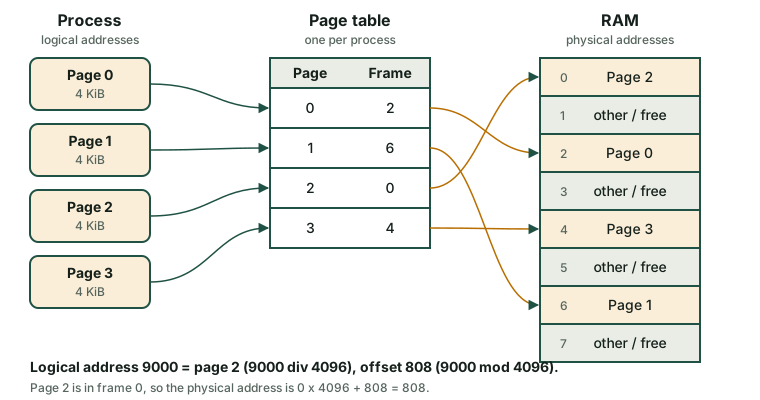
A logical address has two parts: the page number and the offset inside the page.
page number = logical address div page sizeoffset = logical address mod page sizephysical address = frame number × page size + offsetExample. Page size = 4 KiB = 4096 bytes. The process wants to read the logical address 9000.
- Page = 9000 div 4096 = 2. Offset = 9000 − 2 × 4096 = 808.
- The page table says that page 2 is in frame 0.
- Physical address = 0 × 4096 + 808 = 808.
If the page table said frame 5, the physical address would be 5 × 4096 + 808 = 21288.
Fragmentation in paging. There is no external fragmentation, because every frame is the same size. There is a little internal fragmentation, only in the last page of each process. For example, a process of 18 KiB needs ⌈18 / 4⌉ = 5 pages (20 KiB) and wastes 2 KiB.
Page size. Small pages waste less memory but make the page table bigger. Typical size: 4 KiB.
4. Segmentation
Sección titulada «4. Segmentation»In segmentation, the process is divided into logical parts of different size that make sense for the programmer: for example the code, the data and the stack. Each part is a segment. Every segment has a base (where it starts in RAM) and a limit (its length). A logical address is a pair (segment, offset).
Example. Segment table of a process:
| Segment | Content | Base | Limit |
|---|---|---|---|
| 0 | Code | 4000 | 1500 |
| 1 | Data | 9000 | 800 |
| 2 | Stack | 20000 | 2000 |
- Address (1, 500): 500 < 800, so it is valid. Physical address = 9000 + 500 = 9500.
- Address (1, 900): 900 ≥ 800, so the offset is outside the segment. The hardware raises an error and the OS ends the process. In Linux you see Segmentation fault.
Segmentation protects well and makes sharing easy (two processes can share the code segment). But, as segments have different sizes, it suffers from external fragmentation. Some systems combine both techniques: they divide each segment into pages.
| Paging | Segmentation | |
|---|---|---|
| Block size | Fixed (pages and frames) | Variable (segments) |
| Visible to the programmer | No | Yes (code, data, stack) |
| Address | page + offset | segment + offset |
| Fragmentation | Internal, small | External |
5. Virtual memory
Sección titulada «5. Virtual memory»What if the programs need more memory than the RAM that the computer has? The OS uses part of the disk as an extension of RAM. This is virtual memory. The disk area is called:
- swap partition or swap file in Linux;
- page file (
C:\pagefile.sys) in Windows.
It works with paging. Not all the pages of a process are needed at the same time, so the OS loads a page into RAM only when the process needs it. This is demand paging. When the process uses a page that is not in RAM, a page fault happens:
- The CPU raises a page fault and the process is blocked (state Waiting).
- The OS looks for a free frame. If there is none, it chooses a page to remove (see below). If the removed page was modified, it is written to the swap area.
- The OS reads the needed page from the disk into the frame and updates the page table.
- The process goes to Ready and repeats the instruction that failed.
Page faults are very slow compared with RAM, because the disk is thousands of times slower. If the system has too little RAM, it spends most of the time moving pages and the computer becomes almost unusable. This is thrashing. The disk light is on all the time and the programs react very slowly.
Page replacement algorithms
Sección titulada «Page replacement algorithms»When RAM is full, the OS must choose a victim page to remove. Two classic algorithms:
- FIFO: remove the page that has been in memory the longest. Simple, but the oldest page may be one that you use all the time.
- LRU (Least Recently Used): remove the page that has not been used for the longest time. It uses the idea that the past use predicts the future. It gives fewer faults but is more costly to implement; real systems use approximations.
Example. The process uses these pages in this order (the reference string): 3 2 3 5 4 3 5 5 1 5 2 1. It has 3 frames. F means page fault.
| Ref | FIFO: pages in memory (oldest first) | FIFO | LRU: pages in memory (least recently used first) | LRU |
|---|---|---|---|---|
| 3 | 3 | F | 3 | F |
| 2 | 3, 2 | F | 3, 2 | F |
| 3 | 3, 2 | 2, 3 | ||
| 5 | 3, 2, 5 | F | 2, 3, 5 | F |
| 4 | 2, 5, 4 | F | 3, 5, 4 | F |
| 3 | 5, 4, 3 | F | 5, 4, 3 | |
| 5 | 5, 4, 3 | 4, 3, 5 | ||
| 5 | 5, 4, 3 | 4, 3, 5 | ||
| 1 | 4, 3, 1 | F | 3, 5, 1 | F |
| 5 | 3, 1, 5 | F | 3, 1, 5 | |
| 2 | 1, 5, 2 | F | 1, 5, 2 | F |
| 1 | 1, 5, 2 | 5, 2, 1 | ||
| Faults | 8 | 6 |
6. Checking and optimising memory
Sección titulada «6. Checking and optimising memory»To optimise memory you first measure, then you act.
Measure
Sección titulada «Measure»| Tool | System | What to look at |
|---|---|---|
free -h |
Linux | The column available: memory that programs can use. A low free value is normal, because Linux uses free RAM as disk cache. |
top (key M) |
Linux | RES per process; the line MiB Swap |
vmstat 1 |
Linux | Columns si and so: if they are not zero all the time, the system is swapping |
swapon --show |
Linux | Which swap areas exist and how full they are |
| Task Manager → Performance → Memory | Windows | In use, Available, Committed, Cached |
| Task Manager → Processes (sort by Memory) | Windows | Which programs use the most RAM |
Resource Monitor (resmon) |
Windows | Memory tab, Hard Faults/sec |
- Close or restart the programs that use too much memory. Browsers with many tabs are the usual cause.
- Reduce startup programs: Task Manager → Startup apps in Windows. Fewer programs at boot means more free RAM.
- Use lighter software on old computers (for example a light desktop environment in Linux).
- Add RAM if you see constant swapping. This is the real solution to thrashing.
- Keep virtual memory enabled. In Windows, let the system manage the page file. In Linux, a swap area is also useful to hibernate and to move rarely used pages out of RAM.
- A 32-bit system can address only 4 GiB; a 64-bit system is needed to use more RAM.
Comprueba lo aprendido
Sección titulada «Comprueba lo aprendido»-
A system uses fixed partitions of 100 KiB. A process of 72 KiB is loaded. What type of fragmentation appears and how much memory is wasted?
Answer
Internal fragmentation, because the waste is inside the assigned block. 100 − 72 = 28 KiB.
-
Page size is 2 KiB (2048 bytes). Page 3 of the process is in frame 7. What is the physical address of the logical address 6700?
Answer
Page = 6700 div 2048 = 3. Offset = 6700 − 3 × 2048 = 556. Frame 7, so physical address = 7 × 2048 + 556 = 14336 + 556 = 14892.
-
What happens if a process tries to use the offset 1200 in a segment with limit 1000?
Answer
The offset is beyond the limit, so the hardware raises an exception, and the OS ends the process (a segmentation fault in Linux).
-
Explain what a page fault is and which process state is used while the page is read from disk.
Answer
It is an access to a page that is not in RAM. The OS must read it from the disk (or from swap). The process stays in the Waiting state during the read and then goes to Ready.
-
vmstat 1shows large numbers insiandsoall the time and the disk light is always on. What is happening and what do you recommend?Answer
The system is swapping constantly: thrashing. Close memory-hungry programs and, if the situation is normal for your use, add more RAM.
Glossary
Sección titulada «Glossary»| English | Castellano |
|---|---|
| memory manager | gestor de memoria |
| logical (virtual) address | dirección lógica (virtual) |
| physical address | dirección física |
| fragmentation (internal / external) | fragmentación (interna / externa) |
| compaction | compactación |
| paging | paginación |
| page / frame | página / marco |
| page table | tabla de páginas |
| offset | desplazamiento |
| segmentation | segmentación |
| base / limit | base / límite |
| segmentation fault | fallo de segmentación |
| virtual memory | memoria virtual |
| swap / page file | área de intercambio (swap) / archivo de paginación |
| page fault | fallo de página |
| thrashing | hiperpaginación (thrashing) |
| page replacement | reemplazo de páginas |
| reference string | cadena de referencias |
Esta web no usa cookies ni recoge datos personales. Tu navegador solo guarda, en tu propio equipo, algunas preferencias: el tema claro u oscuro, el estado del menú y, en los laboratorios, la última pestaña abierta y el tamaño de letra.