2. Hypervisors
The hypervisor is the piece that makes virtualization possible. If you know which types exist and how the processor helps them, you can choose the right product for each situation and fix the most common error when you create a VM: the missing 64-bit option.
1. What a hypervisor does
Sección titulada «1. What a hypervisor does»A hypervisor (also called a virtual machine monitor, VMM) is the software that creates virtual machines and runs them. It has three main jobs:
- Share the CPU. It decides which guest uses each processor core and for how long.
- Share the memory. It gives each guest its own memory area and keeps the guests apart, so that one cannot read the memory of another.
- Present virtual devices. It shows each guest a virtual disk, a virtual network card, a virtual graphics card… and turns every request of the guest into an operation on the real hardware.
From the point of view of the guest, nothing special happens: it starts, finds a “computer” and runs.
2. Type 1 and Type 2
Sección titulada «2. Type 1 and Type 2»There are two families of hypervisors. The difference is what is under the hypervisor.
Type 1: bare metal
Sección titulada «Type 1: bare metal»A Type 1 (or bare-metal) hypervisor starts directly on the hardware, just after the firmware (UEFI/BIOS). There is no normal operating system under it. It is a small, specialised system whose only job is to run virtual machines.
Applications ApplicationsGuest OS Guest OS------------------------------Hypervisor (Type 1)------------------------------HardwareBecause there are fewer layers, it is faster, more stable and has less attack surface. It is the normal choice in data centres and in the cloud. It usually offers advanced features: moving a running VM between servers (live migration), restarting VMs automatically if a server fails (high availability), and managing hundreds of VMs from one console.
Type 2: hosted
Sección titulada «Type 2: hosted»A Type 2 (or hosted) hypervisor is a normal program that you install on your usual operating system, like a browser or a text editor. The VMs it creates are windows on your desktop. When a guest writes to its disk, the hypervisor asks the host operating system to write a file.
Applications ApplicationsGuest OS Guest OS------------------------------Hypervisor (Type 2, a program)------------------------------Host OS (Windows, Linux, macOS)------------------------------HardwareIt is easy to install and you can keep working with your normal computer, so it is ideal for learning, testing and development. The price is a little more overhead, and one more layer to keep updated and secure. VirtualBox is a Type 2 hypervisor.
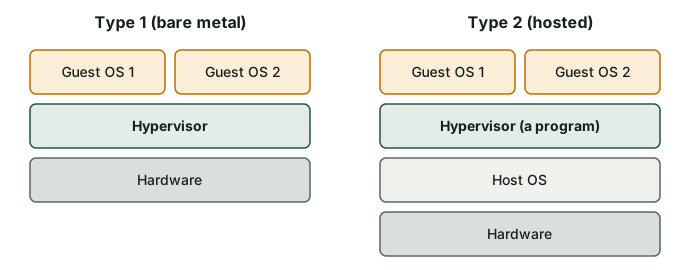
Comparison
Sección titulada «Comparison»| Feature | Type 1 (bare metal) | Type 2 (hosted) |
|---|---|---|
| Runs on | The hardware | A host operating system |
| Performance | Closer to native | A bit lower, especially for disk and network |
| Installation | Dedicated machine, more planning | Like any program |
| Typical use | Servers, data centres, cloud | Laptops, classrooms, testing |
| Management | Many hosts and VMs, central tools | One computer, simple tools |
| Security surface | Smaller | Larger (host OS + hypervisor + guests) |
| Examples | VMware ESXi, Microsoft Hyper-V, KVM, Xen | VirtualBox, VMware Workstation, Parallels Desktop |
Real products
Sección titulada «Real products»| Product | Type | Licence | Where you find it |
|---|---|---|---|
| VMware ESXi | 1 | Commercial (proprietary) | Company servers |
| Microsoft Hyper-V | 1 | Included with some editions of Windows (Pro, Enterprise, Education) and Windows Server | Windows servers and PCs |
| KVM | 1 | Free and open source (part of the Linux kernel) | Linux servers, cloud, and platforms such as Proxmox VE |
| Xen | 1 | Free and open source | Servers and some cloud providers |
| Oracle VirtualBox | 2 | Free and open source (some extras have a different licence) | Windows, Linux, macOS (Intel) |
| VMware Workstation | 2 | Proprietary (check the current terms of the owner) | Windows and Linux PCs |
| Parallels Desktop | 2 | Commercial (proprietary) | macOS |
3. Help from the processor: VT-x and AMD-V
Sección titulada «3. Help from the processor: VT-x and AMD-V»The problem
Sección titulada «The problem»Operating systems are written to run on real hardware. A normal OS kernel expects to run in the most privileged mode of the CPU and to control everything. But if a guest kernel could do that, it would take control of the whole computer and the hypervisor would lose its authority. The hypervisor must intercept the “dangerous” instructions of the guest.
There are three ways to solve this:
| Method | How it works | Speed |
|---|---|---|
| Software virtualization | The hypervisor reads the guest code and rewrites or emulates the dangerous instructions before they run (binary translation). | Slowest, complex |
| Hardware-assisted virtualization | The processor has a special mode for guests. The guest kernel runs almost directly on the CPU, and the CPU hands control to the hypervisor only when a dangerous operation happens. | Fast |
| Paravirtualization | The guest knows that it is virtual and uses special drivers to talk to the hypervisor (for example, virtio network and disk drivers). | Fast for disk and network |
VT-x, AMD-V, EPT and NPT
Sección titulada «VT-x, AMD-V, EPT and NPT»Modern processors have the instructions for hardware-assisted virtualization:
- Intel VT-x on Intel processors.
- AMD-V on AMD processors.
- EPT (Intel) and NPT (AMD) help to translate the memory addresses of the guest to real addresses without the hypervisor doing it by software. This makes memory access much faster.
Current versions of VirtualBox need hardware virtualization to work. In practice you will use a mix of the three methods: VT-x or AMD-V for the CPU, and paravirtualized (or very simple emulated) devices for network and disk.
Check and enable it
Sección titulada «Check and enable it»These features are often disabled in the firmware by default, mostly on laptops. The classic symptom is that VirtualBox only offers 32-bit versions in the list of guest systems, or says that VT-x is not available.
To check it, in Linux:
lscpu | grep -i virtualizationgrep -Ec '(vmx|svm)' /proc/cpuinfoThe first command shows VT-x (Intel) or AMD-V. The second counts the processor entries that have the vmx flag (Intel) or svm flag (AMD). If the number is 0, the feature is absent or hidden. Remember that the output of these commands inside a guest may be different, because they show what the hypervisor lets the guest see.
In Windows you can open the Task Manager, tab Performance → CPU, and look for Virtualization: Enabled.
If it is disabled, restart the computer, enter the UEFI/BIOS setup and look for an option with a name like:
- Intel Virtualization Technology (Intel).
- SVM Mode (AMD).
Enable it, save and restart. The exact name and place change with every manufacturer.
4. Choosing a hypervisor
Sección titulada «4. Choosing a hypervisor»| Situation | Reasonable choice |
|---|---|
| Learning on a school or home PC | VirtualBox (Type 2, free) |
| You already have Windows Pro and need a simple option | Hyper-V |
| A company runs many critical servers | A Type 1: ESXi, Hyper-V on Windows Server, or KVM with a management platform |
| You use macOS and need good integration | Parallels Desktop or another Mac-specific product |
| You want to build a free virtualization server | KVM with a platform such as Proxmox VE |
Check what you have learned
Sección titulada «Check what you have learned»-
What is the main difference between a Type 1 and a Type 2 hypervisor?
Answer
A Type 1 hypervisor runs directly on the hardware. A Type 2 hypervisor is a program that runs on top of a host operating system.
-
Classify these products as Type 1 or Type 2: VirtualBox, KVM, ESXi, Parallels Desktop.
Answer
Type 2: VirtualBox and Parallels Desktop. Type 1: KVM and ESXi.
-
You open VirtualBox and you can only create 32-bit guests. What is the most likely cause and the solution?
Answer
Hardware virtualization (Intel VT-x or AMD-V) is disabled in the UEFI/BIOS setup. Restart, enter the setup, enable Intel Virtualization Technology or SVM Mode, save and restart.
-
Why do Type 1 hypervisors usually have better performance than Type 2?
Answer
Because there is no host operating system between the hypervisor and the hardware. There are fewer layers, so less overhead and fewer things that can fail.
-
What is paravirtualization?
Answer
A method where the guest knows it is virtual and uses special drivers (for example, virtio) to communicate with the hypervisor directly. It avoids emulating real hardware and it is faster for disk and network.
Glossary
Sección titulada «Glossary»| English | Castellano |
|---|---|
| hypervisor | hipervisor |
| Type 1 / bare metal | tipo 1 / sin sistema operativo anfitrión |
| Type 2 / hosted | tipo 2 / alojado |
| hardware-assisted virtualization | virtualización asistida por hardware |
| paravirtualization | paravirtualización |
| binary translation | traducción binaria |
| live migration | migración en vivo |
| high availability | alta disponibilidad |
| kernel | núcleo (del sistema operativo) |
| container | contenedor |
| firmware | firmware |
Esta web no usa cookies ni recoge datos personales. Tu navegador solo guarda, en tu propio equipo, algunas preferencias: el tema claro u oscuro, el estado del menú y, en los laboratorios, la última pestaña abierta y el tamaño de letra.